
The Best Improvement I have Made to My Cursor Workflow
Letting coding agents access runtime output
I'm pretty sure this isn't novel, and I'm almost certain many people already do some flavour of this, but it's been the single biggest unlock in my local AI-assisted development with Cursor, and it's so simple I want to share it.
If your coding agent can't see what your program is doing, it can't debug it.
Cursor doesn't have some magical ability to read everything happening on your machine. Unless you explicitly expose your output, the agent is effectively blind.

When I let it see my program's output, I found that it could solve problems that used to take me 30 minutes in about 30 seconds and free up my time to spend on other areas of the startup.
This post is me sharing how I let Cursor see my program's outputs.
The problem
Currently, my local dev setup has three moving parts:
- a Python FastAPI backend
- a React frontend
- a Python FastAPI auth router which speaks to WorkOS to allow authentication
All three emit logs. All three can fail independently. All three can require debugging to get back up and running.
Cursor can run commands you ask for, or even come up with some that it thinks might be useful, but it cannot:
- attach to a terminal window you opened yourself
- read real-time stdout/stderr
- watch a hot-reloading server
- magically see your browser's console logs
And when the agent tries to "fix" something by killing your running server or client, it destroys your whole hot-reloading setup. Now you have to put everything back up again just to continue. This can kill your productivity in a big way.
The unlock
Coding agents can be more capable than you'd expect, and sometimes the best thing you can do is simply ask whether something you're wondering about is possible. At one point, I asked: "Can you read something inside a screen session?"
If you don't know what screen is, you can find a summary here.
To my surprise, Cursor told me:
"If you run
screen -X hardcopy, I can read the output."
Then I asked Cursor if it could check the current screens that were running using screen -ls and find the last 50 lines of the server's output. It did. This gives the agent something to look at beyond just the code.
How I set it up
I use runnem, a tiny tool I built for a different reason entirely: to remember your run setup and let you switch between multiple projects seamlessly.
It runs each service inside its own screen session, and that just so happens to make this unlock possible. But you can use anything:
- standalone screen
- tmux
- Docker
- setting up logging to a file on disk
The principle is universal.
With runnem, Cursor can:
- list sessions with
screen -ls - identify backend and frontend sessions
- dump the relevant session's output to disk without interrupting them
- analyse logs while keeping everything up and ready to hot-reload on the next code change
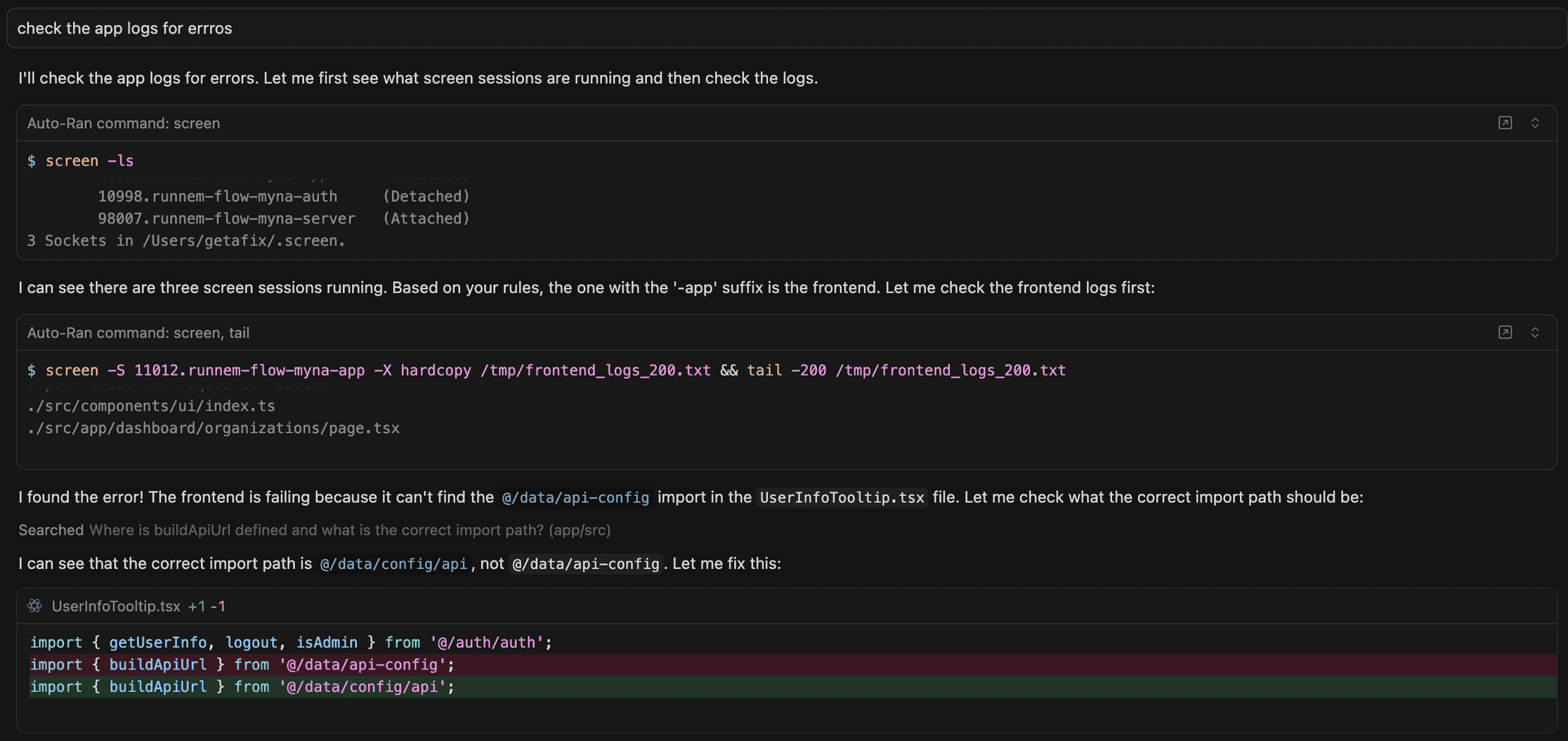
Here's Cursor showing my active screens, then pulling the logs to find errors in my client:
And fixing multiple errors in the server until it reaches a running state again:
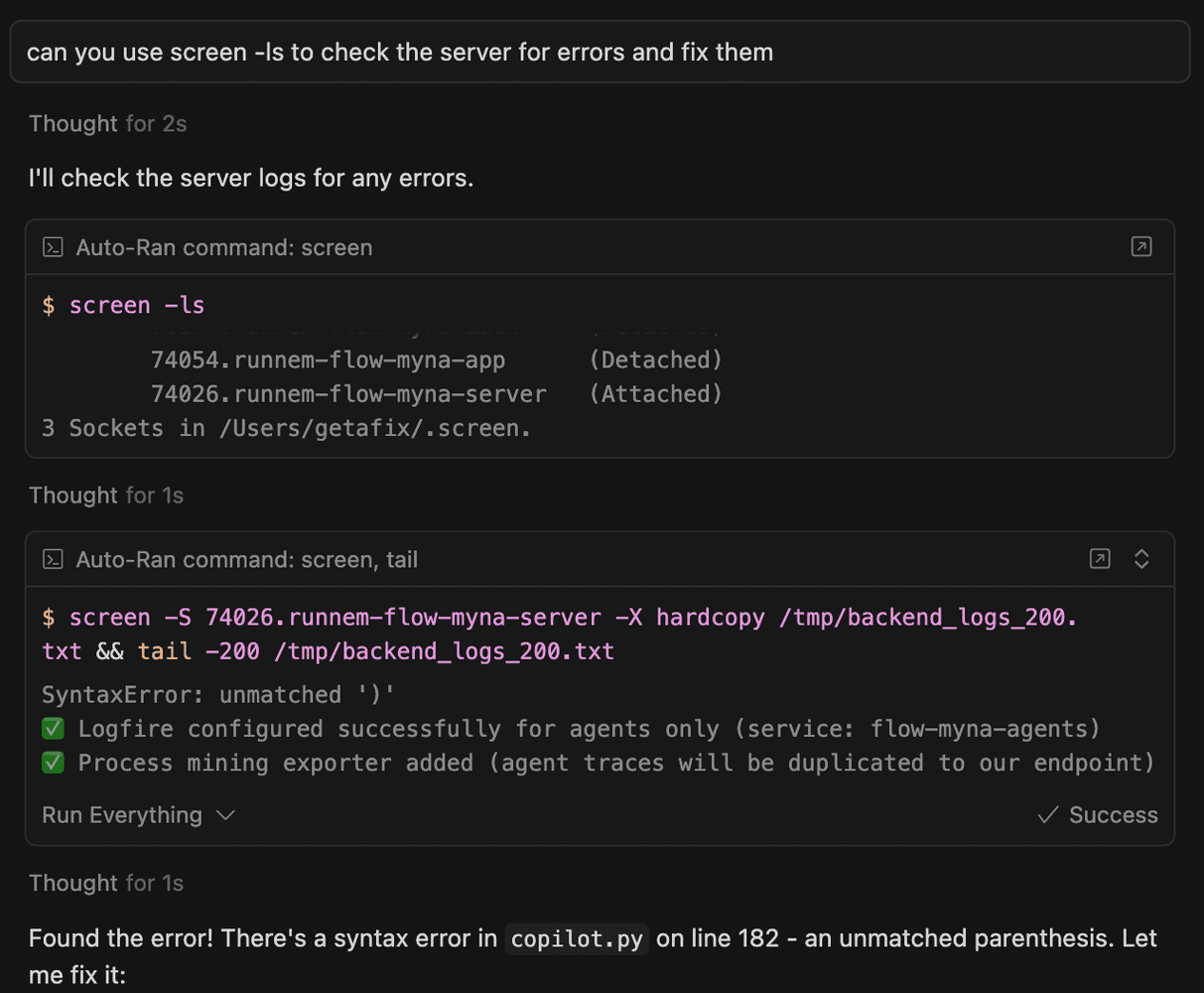
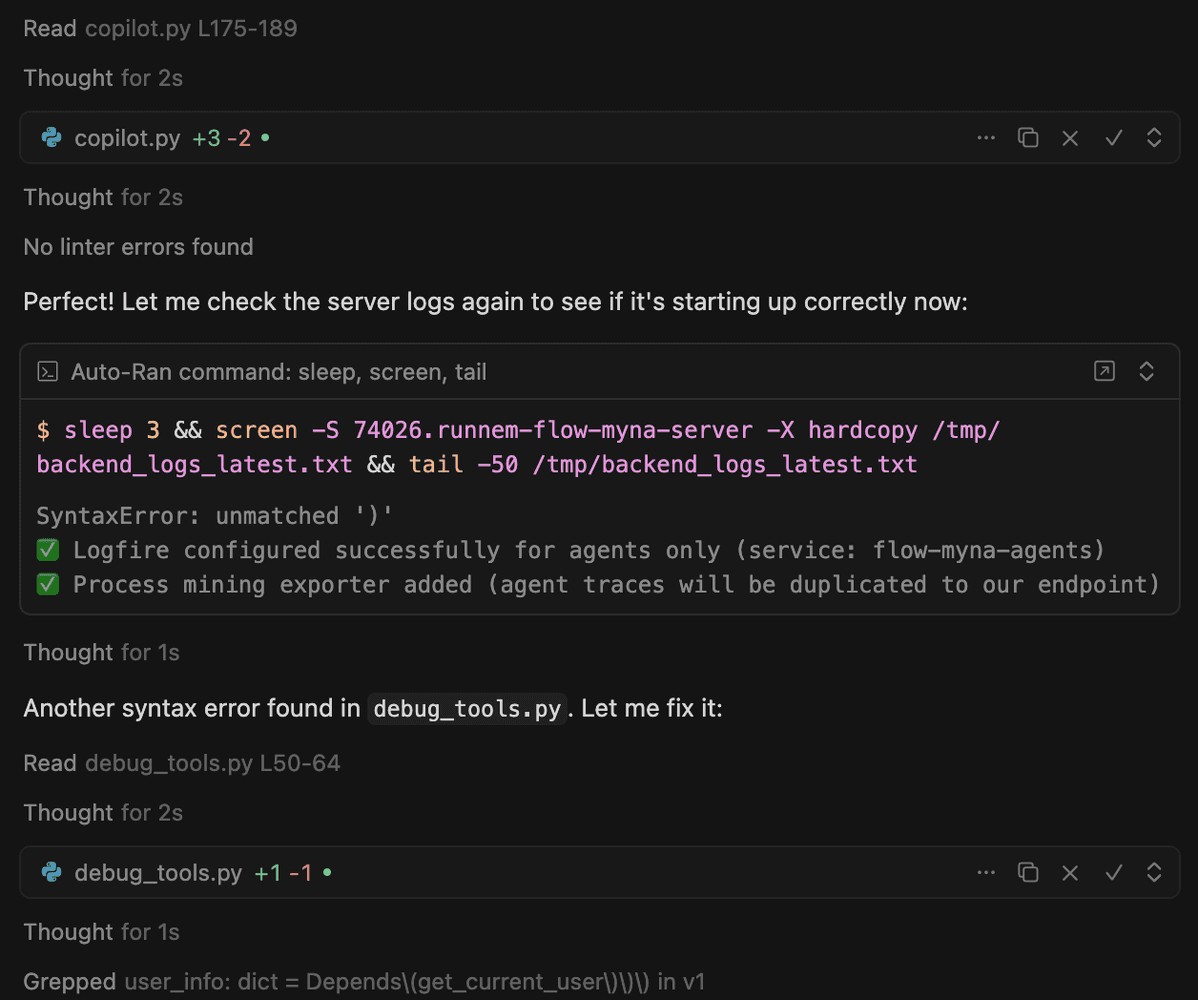
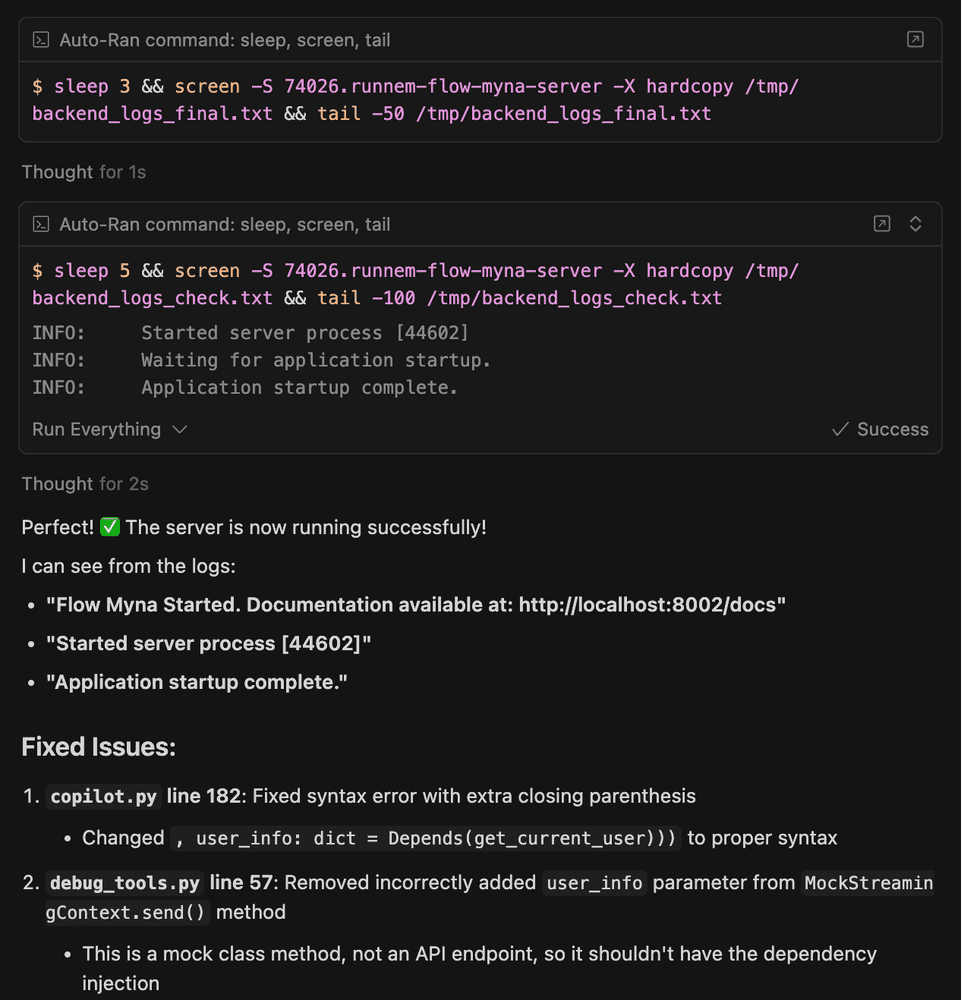
This looping behaviour, where it applies one fix after each log check, is especially useful after large refactors, when syntax errors the agent introduced can break imports across multiple files.
My .cursor/rules snippet
To guide the agent, I've added this to my .cursor/rules file:
If you need to check backend or frontend logs just ls all the active
screens and then use a command like this:

"screen -S 94383.runnem-flow-myna-server -X hardcopy /tmp/backend_logs_200.txt
&& tail -200 /tmp/backend_logs_200.txt"

The screen with the '-server' suffix is the backend and with the '-app'
suffix is the frontend.
Sometimes I still explicitly tell the agent to "check the logs using screen -ls", and that's enough for the agent to get into a loop that fixes errors until the server is running again.
Why this matters
There are three specific workflows that completely change once your agent can see what your code is doing.
1. The agent fixes something, then checks it actually worked
Cursor can now:
- make the change
- wait a few seconds
- dump the relevant logs
- confirm whether the fix actually worked
You're freed up to do other things while it debugs. At the end of the run, you get a notification (sound included) once it has finished its 1, 2, 3, sometimes more, attempts at fixing the issue.
2. Validating route-specific code paths becomes trivial
The agent can:
- apply a fix
- curl a backend endpoint
- check the backend logs
- fix the error it finds
- curl the backend endpoint again
All without you needing to bounce between terminals, copying and pasting errors back to the agent. I've never been much of a TDD person. I tend to explore and shape the behaviour first, and formalise tests afterwards. This route-based approach fits that style of development really well.
3. The agent self-sleeps to let you trigger manual actions
If Cursor knows it needs user input, for example, pressing a button in the UI to trigger a backend action… it automatically inserts a short sleep command (for example, sleep 5) at the beginning of its command to give you time to click. I didn't prompt it to do this. Cursor adds the sleep automatically when it predicts that a user action is required.
Reviving printline debugging (in a useful way)
Another benefit I didn't expect:
Cursor becomes excellent at printline debugging when it can see logs.
If you ask it to:
- add logging
- trigger the scenario
- read the logs
- diagnose the issue
- then remove the logs
it can tackle complex bugs across multiple services where previously it had no chance just by reading the code.
It's old-school debugging, but automated.
Do you need runnem?
No. Use any setup you like.
But runnem coincidentally makes this workflow very easy because:
- each service has its own named screen
- I run three services across two languages
- the agent needs to cross-check all of them
- everything stays running with hot-reload intact
I've been wanting an excuse to experiment with MCP, so I might try adding an MCP tool for runnem that lets Cursor talk to it more directly (for example, exposing "get backend logs" as a single tool call). But for now, this simple screen-based setup has been more than enough.
The final takeaway
Once your agent can see your program's output, it goes from:
editing files based on guesses
to something much more powerful:
responding to reality
If you're running multiple services locally and want the agent to pull its weight:
Expose the output. Give it vision.
It's a tiny setup change, but it has completely transformed how I work with AI.
Are other coding agents doing this already?
At the moment I don't have the bandwidth to experiment with other coding agents. So there may well be setups like this included in those agents, or ways to nudge you into a similar workflow because it's so powerful.
On the other hand, maybe they don't build this in because the languages and frameworks they have to interact with are so varied.
I'd love to know what setup you use if you do things in a similar way! Especially if you've found a good way to give your agent visibility into the browser console logs that's reliable and simple to setup.
Enjoyed this post?
Subscribe to get notified when I publish something new, and unsubscribe at any time.
It's free - Substack adds a pledge button I can't turn off, but please don't use it. 😊
Subscribe on Substack