
I tagged my Linear bugs “autofix” and let Cursor fix them in a single run
The easy stuff gets fixed automatically and the harder stuff gets queued up
This may not be new to some of you. I set it up today and I think it’s going to save me a lot of time going forward, so I’m sharing it in case anyone wants to try the same thing.

I’ve been collecting small bugs in Flow Myna the way most people collect tabs. A cog icon showing through a dropdown. An “(ESC)” hint on a button that no longer needed it. A set of filter toggles I couldn’t click. Nothing serious, all annoying, none of them important enough to interrupt whatever I was actually working on.
So they sat in Linear with screenshots attached, waiting.
Today I wired up something that’s been working well: I label a ticket “autofix”, and Cursor picks the screenshot, title and description up from Linear, looks at it, finds the code, and fixes it. On the first test run it processed four tickets, fixed three, and correctly deferred one for a proper plan.
What I’m really looking forward to is Bronwyn (my wife and co-founder) being able to log small issues in Linear during the day and finding them already fixed in my “Bugs” Cursor tab when I get to it... or at least, that’s the picture in my head. We’ll see how close that gets to reality.
The idea
Cursor agents can already see images. Linear has an official MCP server. So the question was just: can I get the agent to read a ticket, view the screenshot, edit the code, and update the ticket... without me being in the loop for each step?
The loop I ended up with:
- I screenshot a bug, drop it in a Linear ticket, give it a title describing the issue, and add the “autofix” label. That’s it. I don’t normally even leave a description. If I want to nudge the agent in a particular direction I can leave a note (I did this for one ticket where I asked it to look at how another one of my projects handles something), but mostly the title and the screenshot are enough.
- I tell Cursor to “go through my autofix queue”
- The agent pulls the tickets, views each screenshot, diagnoses the bug, fixes it, verifies the fix in the running app, comments on the ticket, marks it done
- I sanity-check the results
The interesting work was making step 3 reliable.
The setup
One MCP server in .cursor/mcp.json: Linear’s official MCP. Remote, OAuth, opens a browser popup the first time you use it. It has a built-in extract_images tool that handles their authenticated image URLs natively, so the agent can see the screenshots without any extra plumbing.
One Linear label called “autofix” (and a second called “plan”, which I’ll get to).
One skill file at .cursor/skills/linear-autofix/SKILL.md that tells the agent what to do.
That’s the whole infrastructure. Five minutes of setup.
The triage gate
The skill file would be useless if it just tried to fix everything in the queue. Some Linear issues are one-line changes (bugs or tiny additions). Others are “let’s add a feedback system to the app”. The agent needs to know the difference.
So before the fix step, the skill has a triage gate. The agent looks at the issue and asks: does this need planning? It defers anything that hits any of these:
- Touches three or more files across different layers
- Needs a schema change
- Has multiple valid approaches with real trade-offs
- Is ambiguous even after viewing the screenshot
- Is a new feature rather than a bug fix or tiny addition
If any of those are true, the agent doesn’t fix it. It relabels the ticket from “autofix” to “plan”, moves it to Backlog, and leaves a comment with two things: why it deferred, and a ready-to-paste prompt I can use to generate a proper plan later in a dedicated session.
This is the bit that makes the system safe. The agent has a clean way to say “this isn’t for me to do alone”, and the work isn’t lost... it’s queued up with most of the context already written down.
The first run, honestly
Four tickets in the queue. Here’s what actually happened.
FMC-95: “This feedback currently does nothing”. The screenshot showed a Feedback button in the top bar. I’d left a note pointing the agent at another one of my projects that has a feedback flow I liked. The agent correctly flagged this as a new feature, re-labeled it to “plan”, and left a comment with a planning prompt I can pick up later. Good call.
FMC-94: “The cogs still comes through the menu on all the pages”. A floating settings cog was rendering above the user dropdown menu. The agent searched the codebase, found two components with conflicting z-index values (header at z-30, graph controls at z-40), and raised the header to z-50. Straightforward fix, correct on the first try.
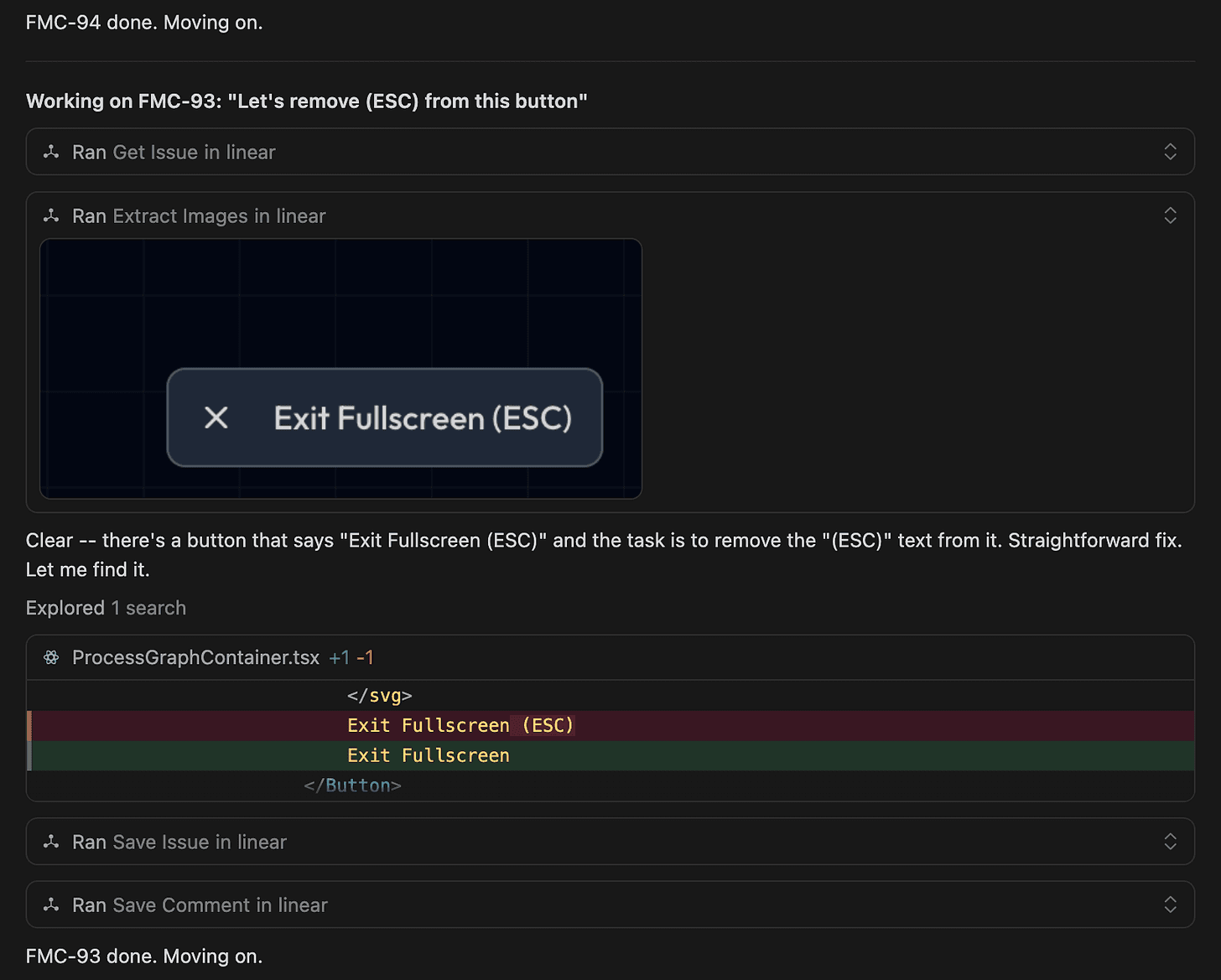
FMC-93: “Let’s remove (ESC) from this button”. The button said “Exit Fullscreen (ESC)” and I wanted just “Exit Fullscreen”. A grep, a one-line edit. Done.
FMC-92: “With the terminal nodes selected, I still can’t select the options bottom left here”. The screenshot showed three toggle buttons that should have been clickable. The agent diagnosed it as another z-index issue, raised the z-index, and marked it done.
Except it wasn’t fixed. On sanity checking the results… I went to the page, hovered over the buttons, and got a “no entry” cursor. The buttons were disabled, not hidden behind something. I told the agent and gave it a bit more information about the problem and it managed to carry out the fix in the next attempt.
I’m including this because it’s the honest version of what these workflows look like. The agent does the legwork. It’s right most of the time. When it’s wrong, sometimes the agent needs some help or some assistance debugging... you give it a nudge with what you’re actually seeing, and it tries again with better information.
The skill file teaches itself
The skill file has a self-improvement step at the end. After each run, the agent reviews the skill and updates it with corrected tool names, new cached data, and edge cases it ran into. The first run is always the roughest. Each subsequent run gets tighter.
After today’s run the agent made a few useful corrections:
- The actual Linear MCP tool names weren’t what it had assumed (it’s
list_issuesandsave_issue, notsearch_issuesandupdate_issue) - The MCP server name in this project was
project-0-mono-linear, not justlinear - The
save_issuetool accepts state and label names directly, so there’s no need to look them up - A separate image-extractor MCP I’d set up initially turned out to be redundant, since Linear’s MCP has its own
extract_imagestool
I committed the updated skill file. The next run will skip all those lookups and go straight to the work. The skill file is version-controlled like any other piece of the codebase.
Realistically, this self improvement might only be useful at the end of the first run where the agent makes mistakes and does extra lookups that it needn’t, but it’s possible that future pitfalls are caught and fixed by an updated skill file.
Where this works and where it doesn’t
It’s worked well so far on:
- Visual bugs with a clear screenshot
- Text changes (”remove this”, “rename that”)
- Z-index and styling issues
- Field name mismatches and other small wiring bugs
I wouldn’t trust it with:
- Anything touching auth, billing, or data integrity
- Schema changes
- New features (the triage gate is for exactly this)
- Anything ambiguous where the right fix depends on a product decision
The “plan” label is a safeguard to make sure that the agent isn’t too ambitious. The easy stuff gets fixed automatically and the harder stuff gets queued up with context for me to handle later. The worst failure mode is the agent doing nothing and asking for help, which is what I want.
I’m not going to claim screenshots are the new unit tests or anything that strong. What I will say is: my visual bug backlog used to be where small annoyances went to die. If this keeps working the way it did today, it’s going to be where small annoyances go to get fixed while I’m doing other things... and where Bronwyn can drop things she spots without it ever landing on my plate as a context switch.
Try it
If you’ve got Cursor and a Linear workspace, this should take you under ten minutes to set up:
- Add the Linear MCP to
.cursor/mcp.json - Create an “autofix” label and a “plan” label in Linear
- Drop a skill file in
.cursor/skills/linear-autofix/SKILL.mdthat encodes the workflow above - Tag a ticket and try it
I’ll share the skill file with anyone who wants it. Drop a comment or DM me and I’ll send it over. I’ll also report back here as the workflow evolves... I’ve only had it running for a few hours and I’m sure I’ll find edge cases that need handling.
Let me know what you think.
Enjoyed this post?
Subscribe to get notified when I publish something new, and unsubscribe at any time.
It's free - Substack adds a pledge button I can't turn off, but please don't use it. 😊
Subscribe on Substack